Describe your ideal customer.
Get a list of local businesses that match.

LeadsBullseye scans Google Maps, checks every business against a description you write, and keeps only the ones that fit.

Example search: dentists with no website

No credit card required.

Illustrative: candidates in, matches out
Built for agencies & local service sellers ·Google Maps coverage: US + Canada ·Checked against your criteria — misses dropped ·Not a bulk exporter — want 65M raw rows? This isn't it.
WATCHThe whole thing, start to finish

See it find, qualify and save a list.

A real search: pick a city and a business type, describe what makes a lead worth calling, and watch the misses get dropped before they reach the list.

No sound · nothing loads until you press play

01 / RANGEFrom map to shortlist, in three shots

Scan the map. Qualify each candidate. Keep the matches.

Every search runs the same sequence — a shortlist you'd actually call.

01 · Scan

Scan the map

Pick a type and area — dentists in Austin, plumbers in Allentown — and every candidate gets pulled in.

02 · Qualify

Qualify with AI

Describe your ideal lead — checked against every candidate, its Google listing data first, live search where needed.

03 · Lock

Lock & work them

Matches land in a workspace with a pitch ready to send.
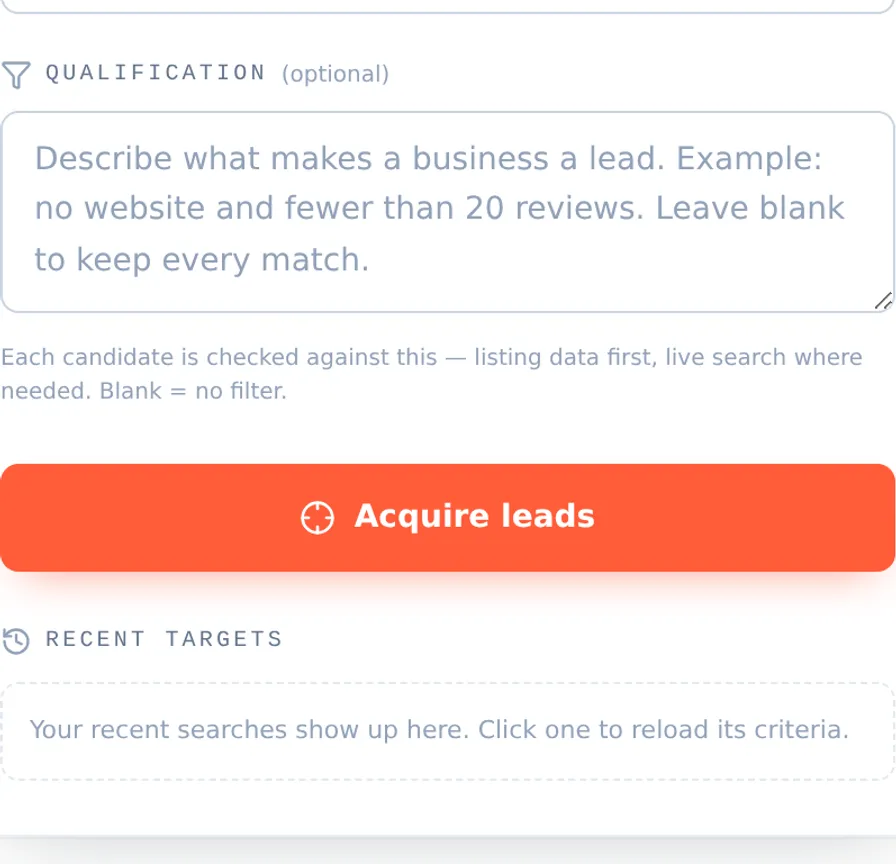
Step 02 — describe what you want
LeadsBullseye search console: a qualification field where you describe a lead in plain language, a note that each candidate is checked against it — listing data first, live search where needed — and the Acquire leads button.

Plain language, not filters. Write the lead you actually want — “dentists in Austin with no website and fewer than 20 reviews” — and every candidate is checked against it before it reaches your list — against its Google listing data first, with a live search only for what the listing can't answer.

Step 03 — get a qualified shortlist
Qualified leads table with columns for business name, category, website, pitch suitability, phone, contact person, city, lead status, and notes — summarizing 8 small businesses, 3 missing a website, each scored Hot, Warm, or Standard with phone numbers and contacts.
Sample — what a qualified shortlist looks like

Search: dentists in Austin, TX — “no website and fewer than 20 reviews”

247 candidates scanned · 6 qualified · every miss dropped before it reached the list.

BusinessScoreWhy it matchedPhone
Cedar Park Family DentalHOT · 96%No website on file; 11 reviews(512) 555-0142
Bright Smile Dental StudioHOT · 91%No website; 8 reviews; no booking link anywhere(512) 555-0173
Lakeline Dental CareWARM · 78%Facebook page only, no site; 17 reviews(512) 555-0119
Oak Hill DentistryWARM · 74%Domain parked; profile photos 4 years old(512) 555-0187
South Congress DentalWARM · 71%No website; 19 reviews, none answered(512) 555-0156
Mueller Modern DentalSTD · 64%Site is a single unindexed page; 14 reviews(512) 555-0134

Sample pitch (first lines): “Hi Dr. — I found Cedar Park Family Dental on Google Maps but couldn't find a website for you anywhere. Patients searching ‘dentist near me’ are landing on practices that have one. I build sites for Austin dental practices…”

Illustrative sample — business names and numbers are fictional (555 range). Run a free search to see live results for your own market.

02 / DELTAScraper vs targeting system

A Google Maps scraper hands you everyone. That's the problem.

Raw exporters dump every listing and leave the sorting to you.

Ordinary scraper

Spray & pray

  • × Thousands of irrelevant rows
  • × Hours of manual filtering
  • × No sense of fit
  • × Same stale list everyone bought
LeadsBullseye

Aim & lock

  • Only businesses matching your criteria
  • Each one checked against your criteria, misses dropped
  • A shortlist worth calling today
  • A tailored AI pitch per lead
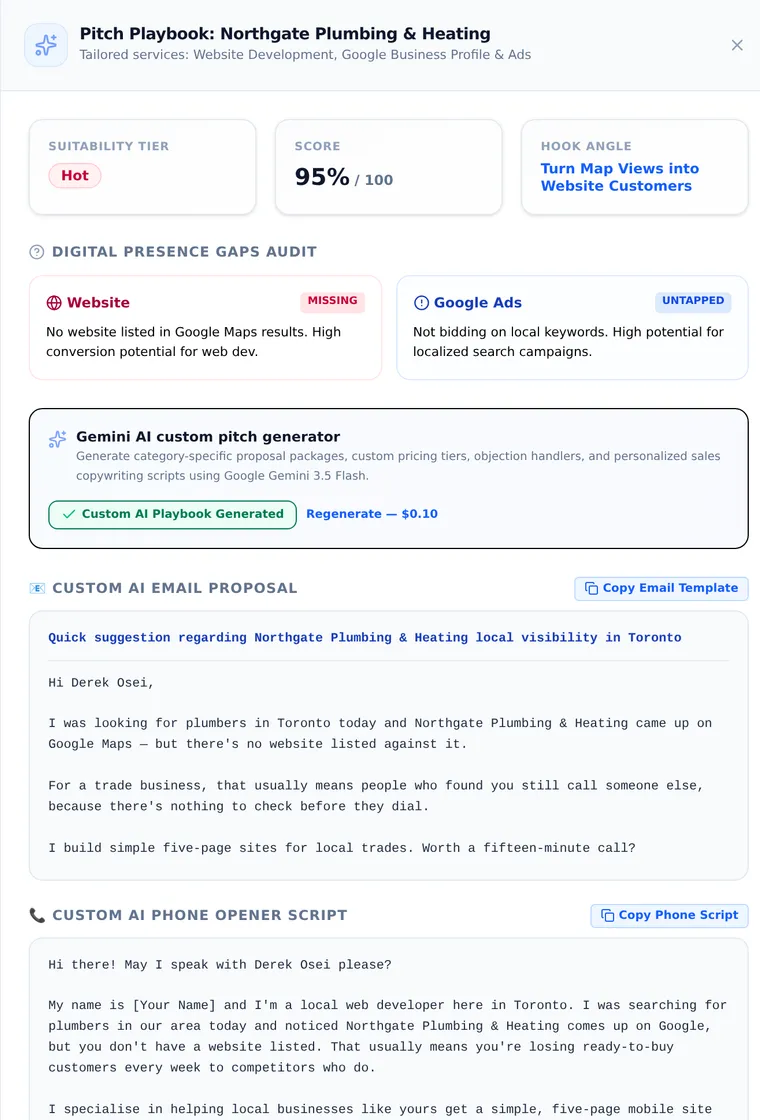
Proof — AI pitch playbook

Every lead comes with a ready-to-send call script and cold email — generated from that lead's actual gaps, not a template.

Pitch Playbook drawer for a Hot, 95% scored lead: a digital presence gaps audit flagging a missing website and untapped Google Ads, plus an AI-generated cold email and phone opener script ready to send.
02B / ENRICHContact enrichment

Published contact details, with receipts — or no charge.

One click per lead pulls publicly listed emails and phone numbers from the business's own site and public directories — every value shows the page it came from and the exact line that contains it. Nothing is guessed.

How it works

One click, sourced values

  • Searches the business's own site and public directories
  • Every value stored with its source page and the exact quoted line
  • Anything that can't be quoted is discarded, not guessed
  • Nothing quotable found → not charged

$0.17 per enrichment from credits. Pro includes 500 contact enrichments / month, Agency 1,500 / month. Unlimited on every BYOK plan including Starter BYOK, running on your own key. Not available on the plain Starter plan.

03 / PLANSPick your range

Pay as you go at $0.10 a lead, or plans from $29 a month.

Every plan includes AI qualification and CSV export. Credits cover overage on our-keys plans; BYOK plans stop at their monthly quota.

BYOK Bring your own Google + Gemini keys — pay less and get 5× the leads.

PAY AS YOU GO
$5 credit
= 50 leads, one-time
$10 MIN. TOP-UP
  • Then $0.10 / lead, pay as you go
  • City or province/state-wide search
  • AI pitches $0.10 each
  • Contact enrichment $0.17 each
  • No subscription, no card
Start free
STARTER
$49 /mo
1,000 leads / mo
  • City search
  • AI criteria qualification
  • AI pitch generator
  • 2 seats
  • No contact enrichment
Choose Starter
MOST TARGETED
PRO
$149 /mo
5,000 leads / mo
  • Everything in Starter, plus province & state-wide search
  • Team workspace · 5 seats
  • Priority support
  • 500 contact enrichments / mo
Choose Pro
AGENCY
$349 /mo
15,000 leads / mo
  • Everything in Pro
  • 15 seats
  • Unlimited saved workspaces
  • 1,500 contact enrichments / mo
Choose Agency

Less than the cost of one afternoon filtering a scraper dump — and a fraction of an $800–3,000/mo lead database. Under a few hundred leads a month, pay as you go beats any flat fee: $0.10 a lead, billed only when a lead actually comes back.

04 / BRIEFBefore you start

Straight answers about qualifying Google Maps leads.

What does "AI-qualified" actually mean? +
You describe a good lead; every candidate gets checked against it — using the Google listing's own data first and a live search only for what that can't answer — matches stay, misses are dropped.
Can I use my own Google and Gemini API keys? +
Every paid tier has a BYOK option: lower price, 5× the quota, keys encrypted and never shown again.
How do I get a Google Maps Platform API key? +
Needs a Google account and billing enabled — even the free tier requires a card.
  1. Sign into Google Cloud Console.
  2. Create or pick a project.
  3. Enable billing.
  4. Enable Places API (New) and Maps JavaScript API.
  5. Create an API key under Credentials.
  6. Copy it (AIza…) and restrict it to those APIs.
  7. Paste it into Organization settings.
Menus shift over time — look for the closest match.
How do I get a Google Gemini API key? +
Powers AI qualification and pitch generation, via Google AI Studio.
  1. Sign into Google AI Studio.
  2. Get API keyCreate API key.
  3. Pick or auto-create a project.
  4. Copy the key (AIza…).
  5. Paste it into Organization settings.
Labels may shift — follow the closest match.
Where does the data come from, and can I trust it? +
From Google Maps, checked against your criteria — using the listing's own data first and a live Google Search when that can't answer — a starting point, not gospel. See the anti-spam reminder at export and our Terms.
Where does contact enrichment get its data? +
The business's own website and public directories. Each value — email, phone number, owner or manager name, social link — is stored with the exact page and the quoted line it came from; anything we can't quote, we discard. Hover any enriched value to see the source. We don't claim full coverage, and we only report what the page states.
Do you verify email deliverability? +
No, and it matters enough to say plainly. LeadsBullseye decides which businesses are worth contacting — it does not check whether an address will bounce, and it does nothing to protect your sending domain's reputation. Enriched emails come from the business's own site and public directories, stored with the page and quoted line they came from, but they are not run through a verification service. If you send cold email at volume, put your list through a dedicated verifier first: bounce rate is what damages sender reputation, and it damages it fast.
Do I have to worry about anti-spam laws? +
Yes — you're responsible for outreach under CASL, CAN-SPAM, TCPA, and GDPR/ePrivacy: lawful basis, honoured opt-outs, self-identification. We remind you before every export.
Can I get a surprise bill? +
Nothing is ever invoiced at the end of the month for going over. There is no metered subscription line, so a plan cannot bill you more than its published price. Each paid plan includes a monthly lead quota; reach it and the work stops with a message. If you are also holding pay-as-you-go credit, the work continues against that prepaid balance instead of stopping — leads and AI pitches at $0.10 each, contact enrichment at $0.17 where your plan includes it — until the balance is empty. BYOK plans never draw on credit at all: leads and pitches stop at the quota, and contact enrichment is unlimited. Either way nothing reaches your card on its own: credit is bought up front, and auto-reload stays off until you turn it on, with a trigger, an amount and a daily cap you control.
Can I cancel anytime? +
Yes. Monthly or yearly (one month free); cancel anytime and keep access until the period ends. The Pay as you go plan needs no card.
05 / OPERATORWho's behind this

Built by someone who needed the list himself.

Hicham Mounir, founder of Himo Tech.

I'm Hicham Mounir, founder of Himo Tech. I built LeadsBullseye for myself. I was selling website development to local businesses, so I needed a list of the ones that didn't have a website — and I paid for map exports to get it. Ten thousand rows would come back and I'd spend the afternoon deleting 9,700 of them. That was the job, before the actual job started — so I wrote something to do the deleting for me.

I'll be honest about how the selling went: I wasn't a good closer, and I didn't land many of those clients. That was down to me, not the list. But hardly any of the businesses I called turned out to be the wrong ones — the list kept being right even on the days I wasn't. That's when it stopped being a script I ran for myself and became this.

Questions? Email me directly at hmounir@himo-tech.ca — I answer every message myself. · LinkedIn

Put your next local leads in the crosshairs.

Pick a business type, describe your ideal customer, and watch the list narrow to the ones worth calling.

Start free — no card